About OrbitalCam
The OrbitalCam is a highly customizable and easy-to-use camera asset. It consists of a Rig with the main camera component and one or more input components.
The system supports both the Legacy Input Manager and the New Input System Package. Keyboard, mouse, touch, and UI buttons all work on either.
For more information check out the explanation of all the Controls or read the Island City Builder example.
You can also read the OrbitalCameraSystem class reference for the full docs, or dive into the Public API if you need to control the OrbitalCam from other scripts.
Features
- Works with both Legacy Input Manager and New Input System Package
- All features can be turned on/off as needed
- Mouse
- Drag the ground to pan with any mouse button (default: right)
- Rotate and tilt around target with any mouse button (default: middle)
- Edge scrolling
- Keyboard
- Move around with keyboard (default: WASD + arrow keys)
- Rotate with keyboard (default: q + e)
- Rotate in steps (default: 90 degrees)
- Tilt with keyboard (default: f + c)
- Zoom with keyboard (default: z + x)
- Touch
- Move with touch (default: one finger)
- Rotate and tilt with touch (default: two fingers)
- Zoom with touch (default: two finger pinch)
- Automatically adjust height to terrain, specify layer masks for terrain
- Bounding box limits the playable area
- Variable movement speeds for key/button press
- Orthographic camera support
- The Public API can be used to let you control aspects of the script from elsewhere in your code. Fx. for use in tutorials, cutscenes, or when clicking the minimap, etc.
Screenshot
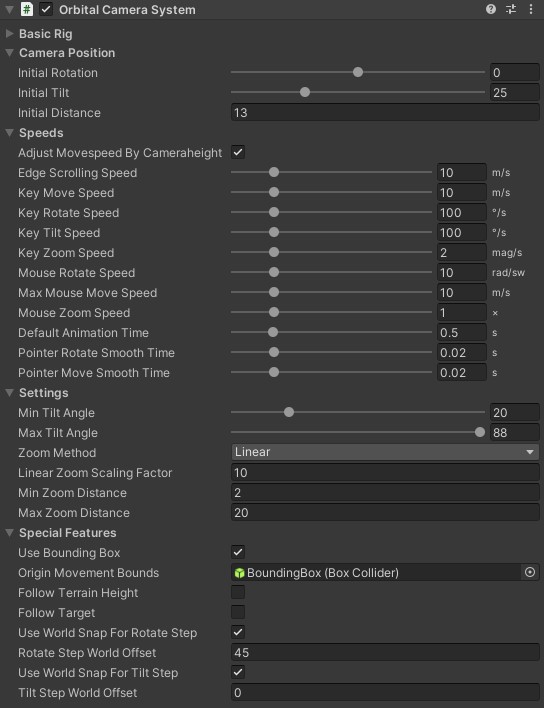
Example Scenes
License
OrbitalCam is licensed as an Extension Asset under the Standard Unity Asset Store EULA. One license is required for each individual user.
Support
If you experience any bugs, please don't hesitate to contact me for support.